AI Usage Meter
Every AI subscription's limits on one screen — so you know how much you have left before you hit a wall mid-task.
- Free
- Android
- Productivity
- Rated Everyone
Screenshots
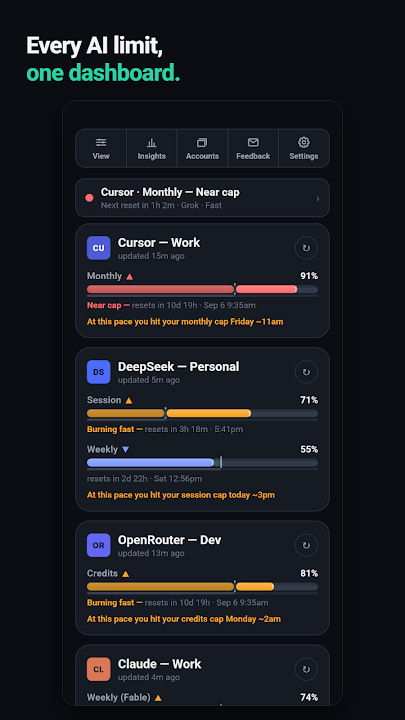
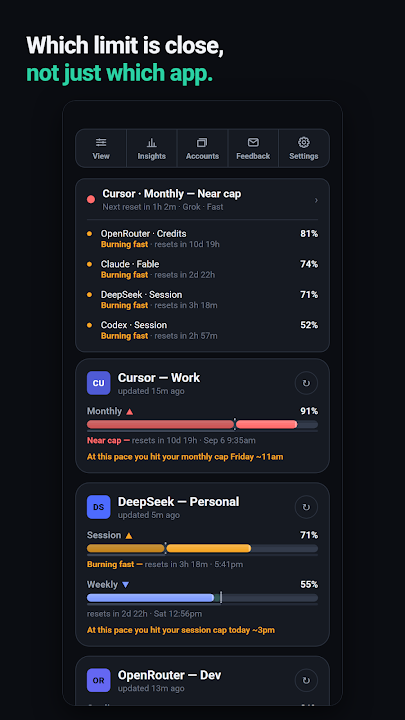
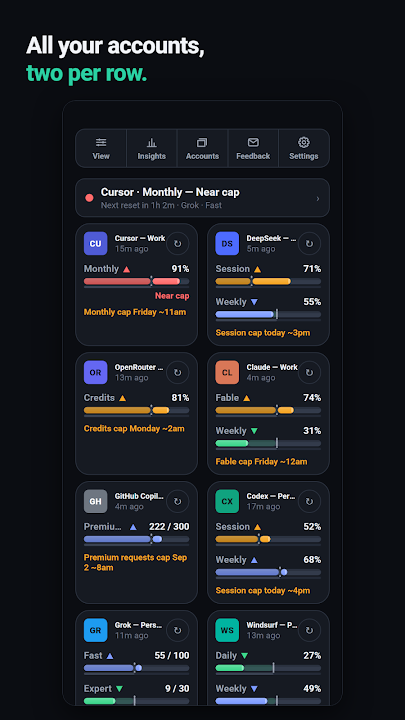
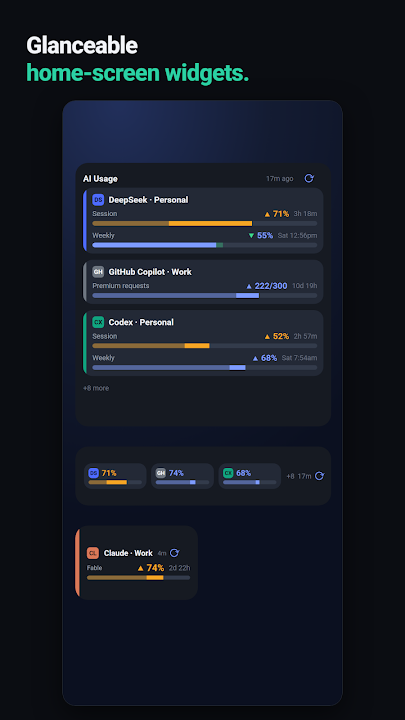
Stop guessing how much of your AI plan is left
If you pay for more than one AI tool, you already know the problem: each one has its own limits — a session cap here, a weekly cap there, a monthly credit balance somewhere else — and each one resets on its own schedule. You usually find out you have run out at the worst possible moment.
AI Usage Meter reads your usage directly from each provider and shows it all on a single dashboard. Every account gets a live bar for each of its limits, a countdown to when that limit resets, and a pace indicator that tells you whether you are on track to run out before the reset. Bars go amber, then red, as you get close.
Supported AI providers
Claude, ChatGPT / Codex, Gemini, Grok, Cursor, Windsurf, Perplexity, GitHub Copilot, DeepSeek, DeepInfra, OpenRouter, Novita and MiniMax — with more added regularly. Where a provider breaks its limits down by model, so does the app: Claude's weekly Fable limit, or Grok's Fast, Expert and Heavy tiers, each get their own bar.
Pay-as-you-go accounts show real money rather than a percentage: your current balance, what you spend on an average day, and the date the balance is projected to run out.
Warnings before you hit the wall
- Custom alerts — get a notification at 90%, or at whatever percentage you choose.
- Low-balance alerts for prepaid accounts, set as a currency amount instead of a percentage.
- Pace tracking — see "at this pace you hit your cap Friday ~11am" before it happens.
- Weekly digest (opt-in) — which limits you hit, your busiest day, and how the week compared.
- Insights — how often each limit actually runs out, across every account.
Check it without opening the app
- Home-screen widgets: a single-provider card, or an overview of every account. They refresh on their own.
- A Quick Settings tile showing whichever limit is closest to running out.
- App shortcuts — long-press the icon to jump to Insights, Settings, or the account that needs attention.
- Add a widget in one tap from any provider's card.
Make it yours
Resizable cards, a denser layout when you want more on screen, light and dark themes with Material You colours, and custom backgrounds — a solid colour or your own photo, for the whole dashboard or a single card. Your usage history can be exported as CSV or JSON at any time.
No account, no sign-up, no server, no analytics and no third-party SDKs. Your sessions are stored only on your phone, in Android's encrypted keystore, and are used only to read your own usage from each provider. The app opts out of Android cloud backup, so your history is never uploaded anywhere.
Frequently asked questions
Which AI services does AI Usage Meter support?
Claude, ChatGPT / Codex, Gemini, Grok, Cursor, Windsurf, Perplexity, GitHub Copilot, DeepSeek, DeepInfra, OpenRouter, Novita and MiniMax, with more added regularly.
Does AI Usage Meter send my data anywhere?
No. There is no LunchBox ClassX server and no analytics. Your sessions stay in Android's encrypted keystore on your phone, and the app only talks to each AI provider to read your own usage.
Can it warn me before I run out?
Yes. Set an alert at 90% or any percentage you like, or a low-balance alert in currency for prepaid accounts. A pace indicator also predicts when you will hit each cap.
Is there a home-screen widget?
Yes — a single-provider widget and an all-accounts overview, plus a Quick Settings tile that shows the limit closest to running out.
Can I export my usage history?
Yes, as CSV or JSON, whenever you want. The history lives in a local database on your phone and is deleted if you uninstall the app.
Is AI Usage Meter free?
Yes, it is free to download on Google Play.
Other apps you might like.



Want an app like this — but yours?
We build for clients too: mobile apps, private APIs, dashboards, automation, machine learning. Bring the idea, we'll handle the build.